Using the .to_euro() function in DocMergy
- To dynamically change number data to European format, you’ll need to use the .to_euro() function in your template.
.to_euro() process
- DocMergy recognises the .to_euro() funtion on the end of a token
- Try to convert the number to a Float (Number with decimals)
- If conversion to a float fails a blank value will be returned back to the token location
- Check to see if token contains decimal_points=
- If decimal points is 0 then remove decimal value
- If decimal points value is smaller then 0 keep decimal values (eg: -1)
- If decimal points are larger then 0 then display that many values after decimal point
- If no decimal points are provided display 2 numbers after decimal point
- Check to see if token function contains euro_sign=
- If euro_signpoints is True, display € before number
- If euro_sign points is False, remove € from token output
- If euro_sign points is not provided, display € before number
- Replace token with generated generated value.
- This value is text and cannot be used for math funtions.
Using the .to_euro() function in DocMergy
Function Syntax
Function syntax is the set of rules that define how to write a function, including its name, parameters, code block, and optional return value.
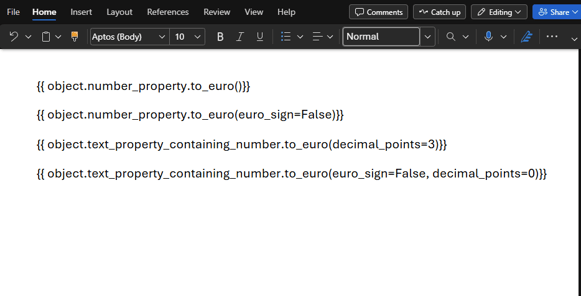
.to_euro(euro_sign, decimal_points)
Argument Breakdown
First argument breakdown [euro_sign]
- This is a True or False option that changes if a € sign will be displayed before the converted number is displayed
- This argument defaults to True
Second argument breakdown [decimal_points]
- This is the number of values would like to display after the decimal point
- If 0 is provided the decimal point and values after will be removed from the number.
- This argument defaults to 2
Basic token explanation
{{ object.amount.to_euro() }}
Here's what it means step-by-step:
- Look at the enrolled object property called "amount" and get the value contained within this property
- No argument for euro_sign is provided so display € sign
- No argument for decimal_points is provided so display 2 numbers after decimal point
- Amount in HubSpot = 45,225.5
- Output in DocMergy = €45.225,50
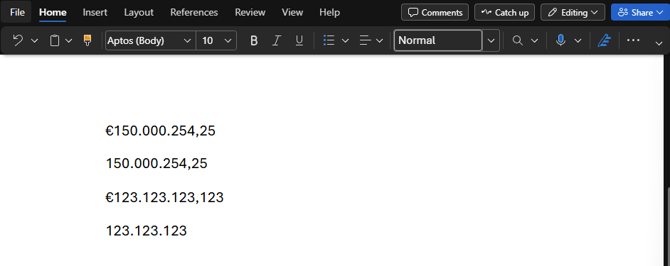
- Example output:
- Number Property = 150,000,254.25555
- Text property containing number = 123,123,123.123