
What does the 'Create Record From Line Item' action do?
The 'Create Record From Line Item' action allows you to automatically create a new record (such as a deal, contact, or company) based on the details of a line item in a deal. This action is useful for generating new records that reflect the specifics of each line item, and you can choose how to associate these new records to the original deal.
How it Works
Select Object Type
- Choose the type of record you want to create (e.g., deal, contact, company, etc.).
Association to Enrolled Record
- Select the association label that links the new record to the original enrolled deal. This ensures the new record is properly associated with the deal from which the line item came.
Record per Line Item or per Quantity
- You can choose to create one record per line item or one record per line item quantity (e.g., if the quantity is 3, it will create 3 records).
Custom Properties
- You can map up to 5 custom properties to the new record being created, providing further customization for each created object.
creates a record from line item, select object type you want to create, then select association label to the enrolled record
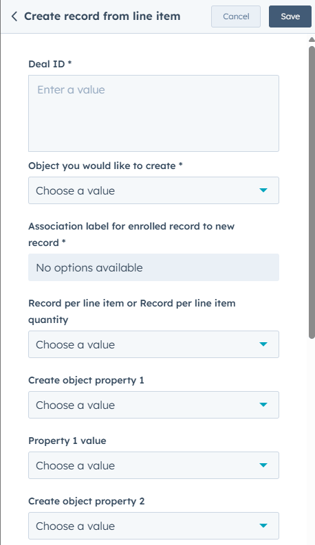
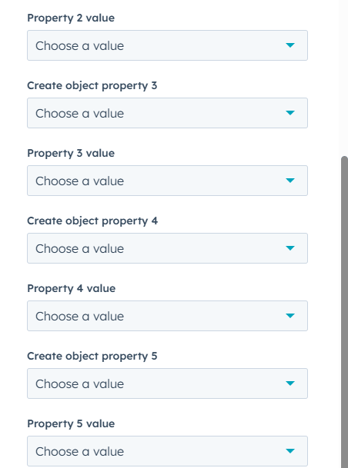
- Deal ID: The deal from which the line item is pulled.
- Object Type Dropdown: Choose which type of record (e.g., deal, contact) to create.
- Association Label: Specifies how the new record will be associated with the original enrolled deal.
- Record per Line Item or per Line Item Quantity: Determines whether to create one record for each line item or one per quantity.
- Create Object Property 1-5 & Value: Custom properties that can be mapped to the newly created record.
Step 1: Create a New Workflow
- In HubSpot, navigate to Automation > Workflows.
- Click Create workflow and select Deal-based workflow.
- Choose Start from scratch and click Next.
Step 2: Set the Enrollment Trigger
- Click Set up trigger.
- Choose a deal-based property that determines when a new record should be created from a line item
- Click Apply filter and then Save.
Step 3: Add the ‘Create Record From Line Item’ Action
- Click + (Add an action) and search for Create Record From Line Item.
- Select the action to configure its settings.
Step 4: Configure the Action Settings
Deal ID
- Select the Deal ID that contains the line item.
Object Type Dropdown
- Choose the type of record to create (e.g., Deal, Contact, Company).
Association Label
- Select how the new record should be associated with the original enrolled deal.
Record per Line Item or per Line Item Quantity
- Per Line Item: Creates one record per line item.
- Per Line Item Quantity: Creates multiple records based on the quantity of the line item
Custom Property Mapping (Optional)
- Create Object Property 1-5 & Value: Map up to 5 custom properties from the line item to the new record.
Click Save to finalize the action.
Step 5: Review and Activate the Workflow
- Click Review to check for any missing fields.
- Click Turn on to activate the workflow.