
The 'Clone Line Items Between Deals' action allows you to copy line items from one deal (the source deal) and clone them into another deal (the target deal). This action is useful when you need to replicate the same set of line items across multiple deals, saving time and ensuring consistency in deal information.
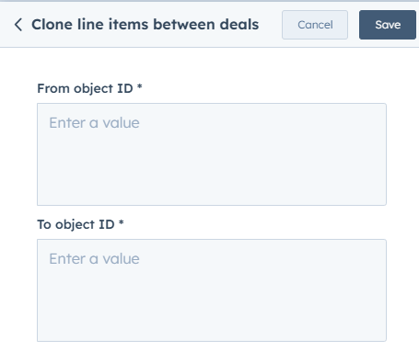
How it Works
From Object ID: This is the source deal ID, from which the line items will be copied
To Object ID: This is the target deal ID, where the cloned line items will be added.
Step 1: Create a New Workflow
- In HubSpot, go to Automation > Workflows.
- Click Create workflow and select Deal-based workflow.
- Choose Start from scratch and click Next.
Step 2: Set the Enrollment Trigger
- Click Set up trigger.
- Choose a deal-based property that determines when line items should be cloned (e.g., "Deal Stage is Contract Sent").
- Click Apply filter and then Save.
Step 3: Add the ‘Clone Line Items Between Deals’ Action
- Click + (Add an action) and search for Clone Line Items Between Deals.
- Select the action to configure its settings.
Step 4: Select the Source and Target Deals
Source Deal (From Object ID)
- From Object ID: Enter the deal ID of the source deal containing the line items to be cloned.
Target Deal (To Object ID)
- To Object ID: Enter the deal ID of the target deal where the cloned line items will be added.
Click Save to finalize the action.
Step 5: Review and Activate the Workflow
- Click Review to check for any missing fields.
- Click Turn on to activate the workflow.